Automating GitHub with Python: All CRED Operations Covered

By using Python, we can automate various GitHub operations like creating, deleting, and editing repositories and files. This blog will guide you through the process of automating these tasks, making your development workflow more efficient.
Before diving into the code, you'll need to set up a few things
Create a GitHub Personal Access Token
To interact with the GitHub API, you'll need a personal access token. This token authenticates your requests to the GitHub API. Here’s how to generate one:
For Access Token Visit :
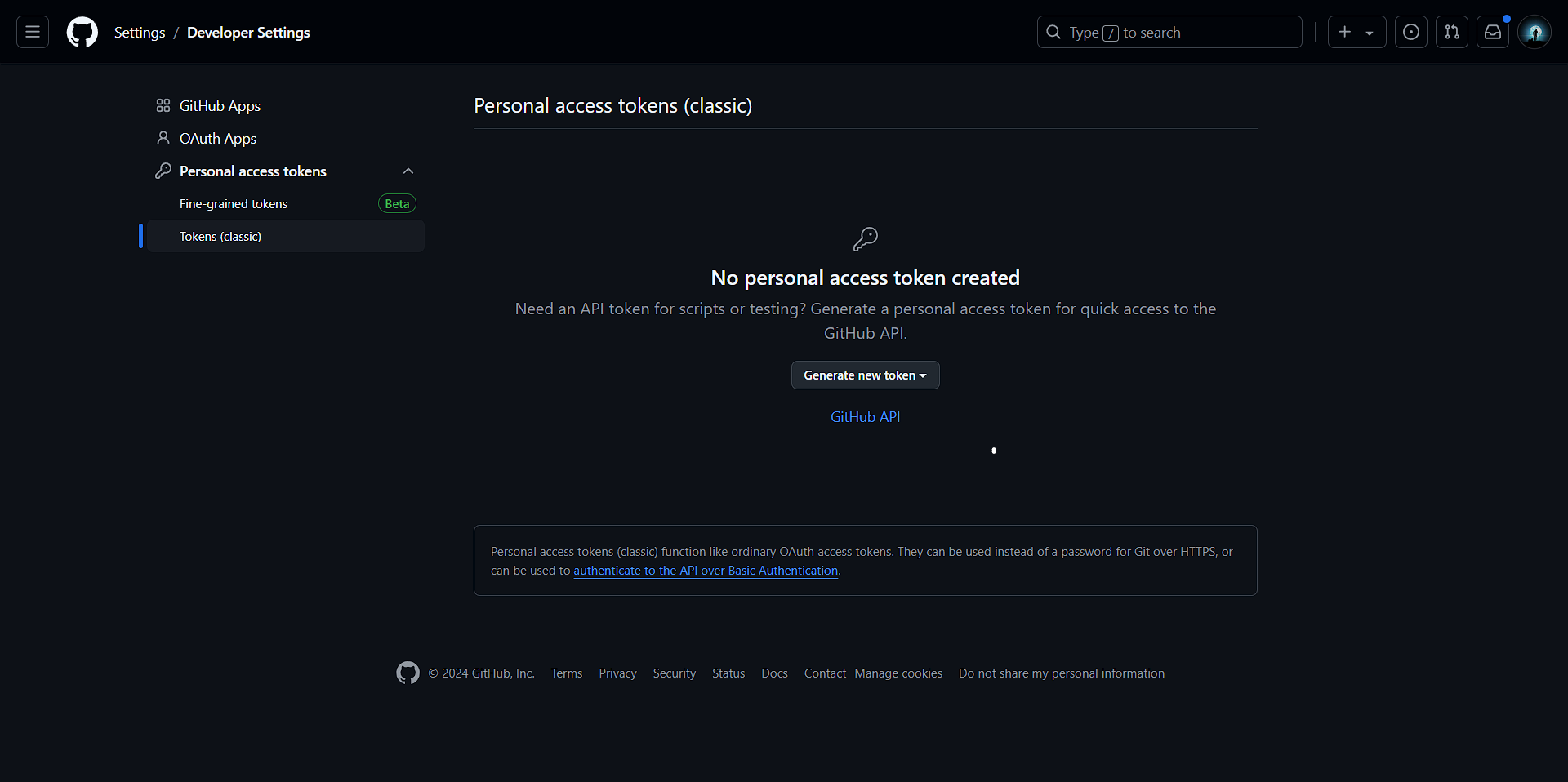
Generate new access Token For You
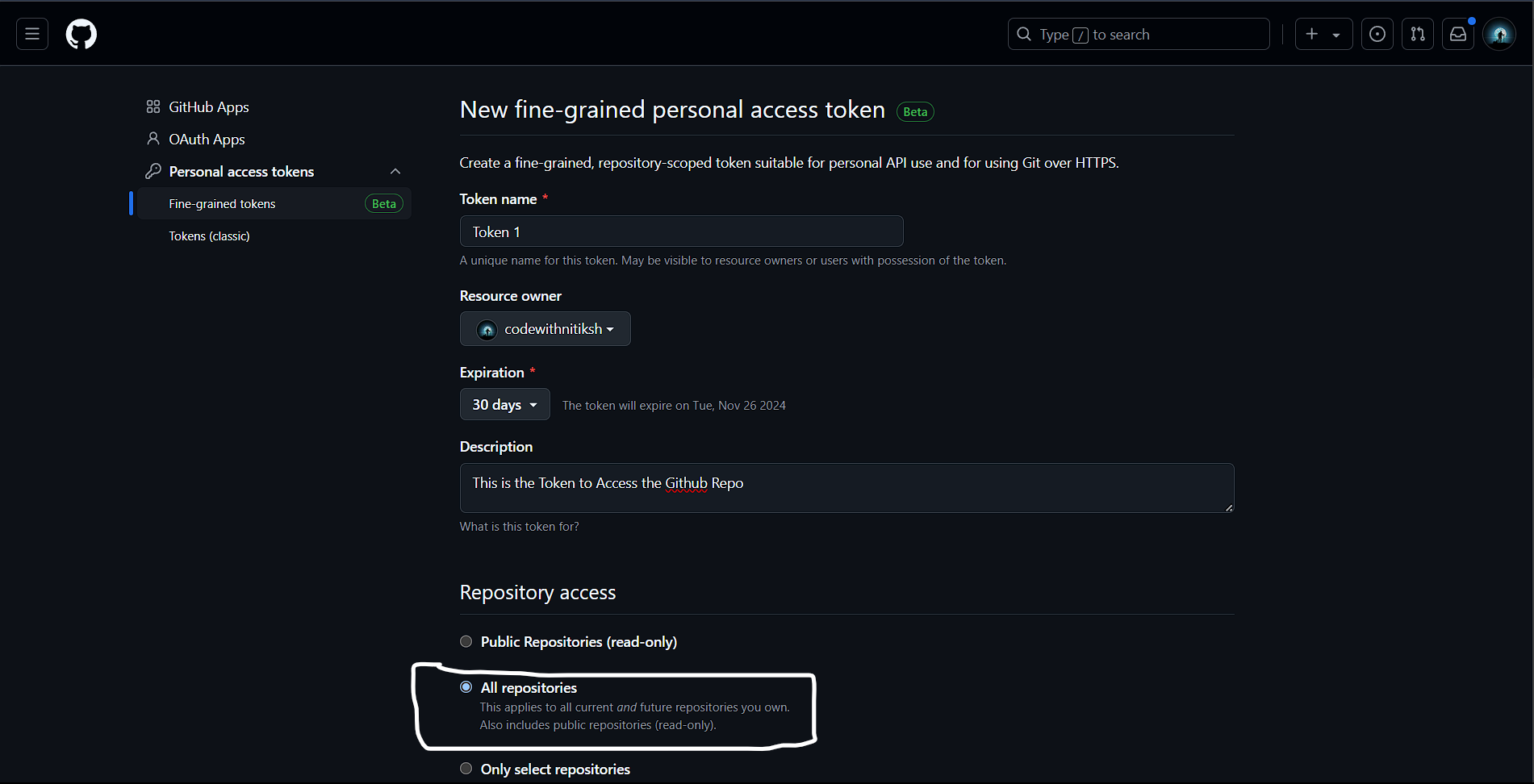
Select All Repo's
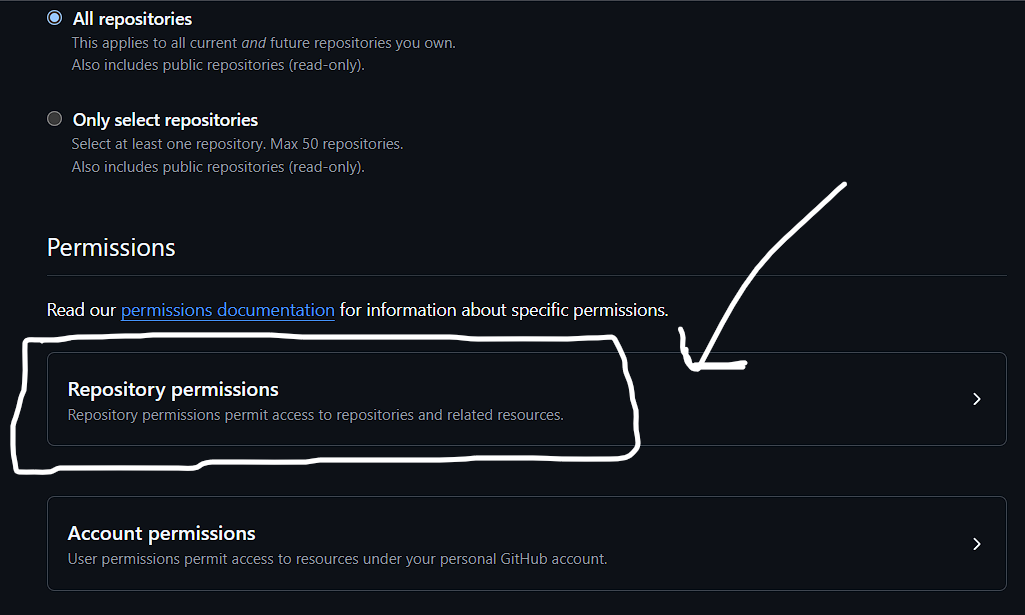
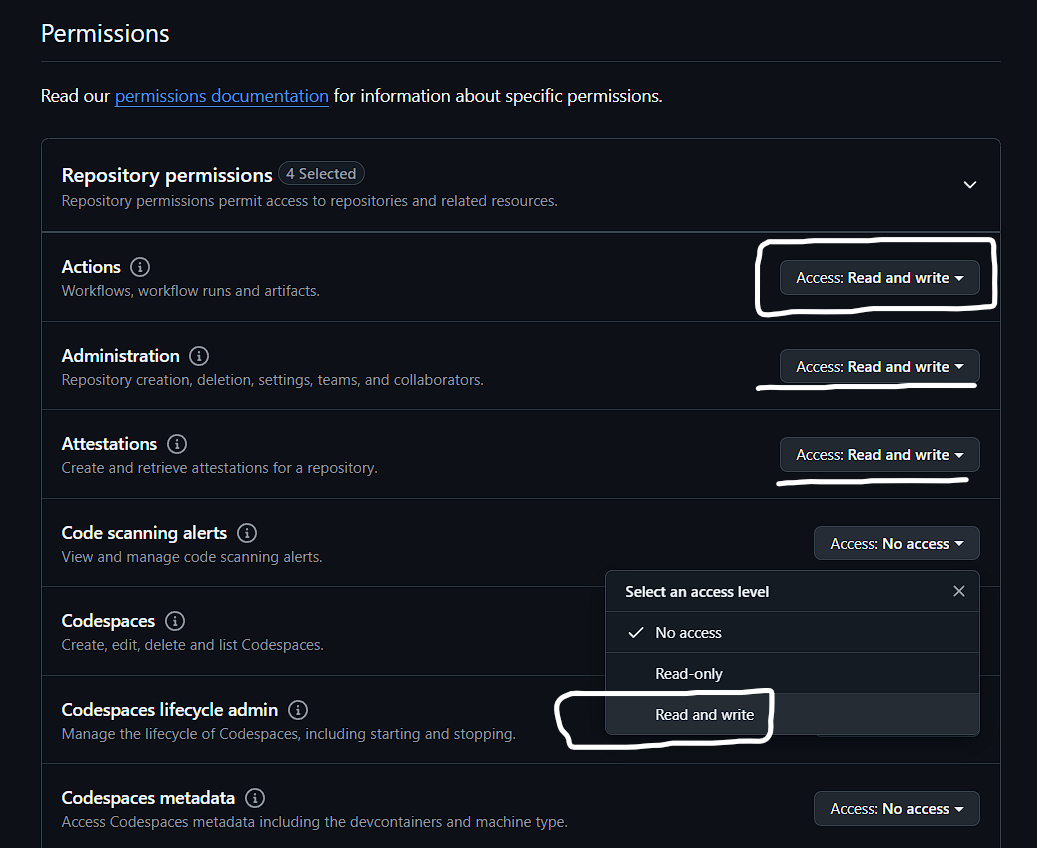
Set all repo's permitions to read and write
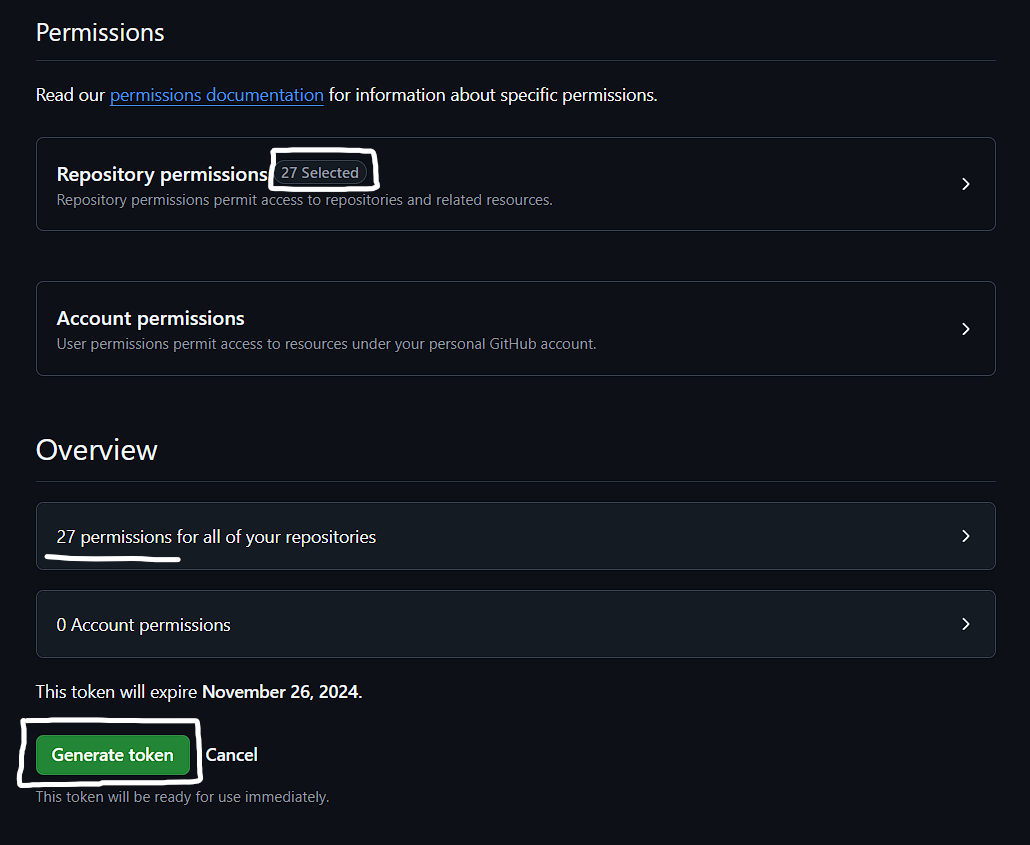
Click on Generate Button
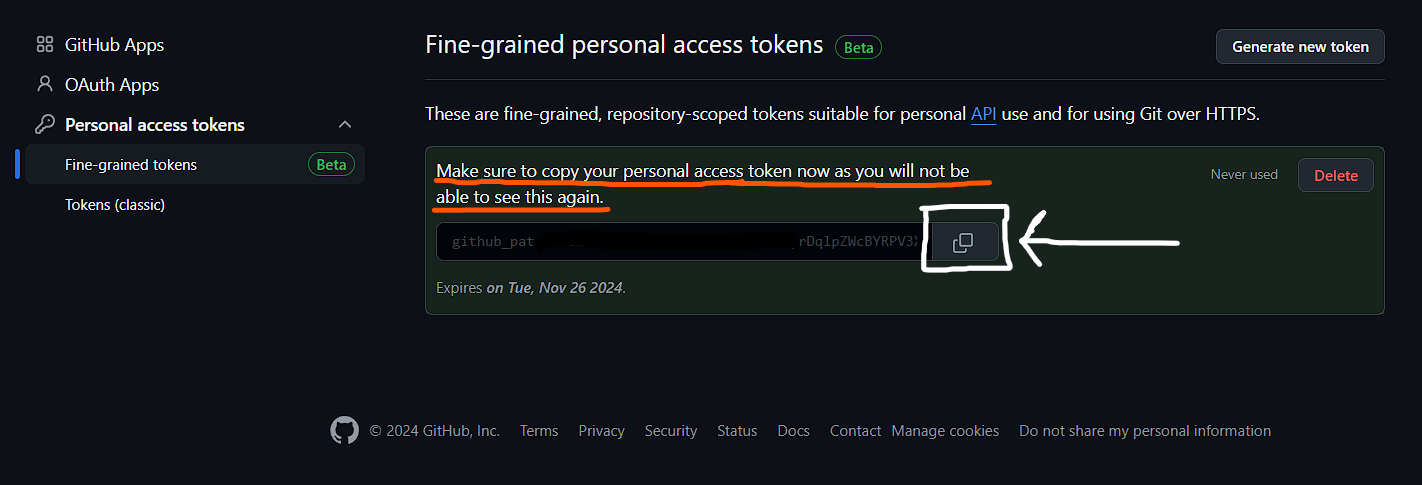
Don't Forgot to Copy Your Token, as later you will not able to see this token again, in that case you have re-generate token.
Store Your Credentials Securely
Create a file named creds.py to store your GitHub credentials:

# creds.py
# Your GitHub personal access token, generate from - https://github.com/settings/tokens
access_token = 'your_github_token_here'

# Your GitHub username
owner = 'your_github_username_here'
Creating a New Repository
Now that you have your environment set up, let's dive into creating a new GitHub repository using Python.
import requests
from creds import owner, access_token

# The name of the repository
repo_name = input("Enter repo name: ")

# Create a new repository
def create_repository():
    url = f'https://api.github.com/user/repos'
    headers = {'Authorization': f'token {access_token}'}
    payload = {'name': repo_name, 'auto_init': True}
    response = requests.post(url, headers=headers, json=payload)

    if response.status_code == 201:
        print(f'Repository "{repo_name}" created successfully.')
    else:
        print(f'Failed to create repository. Status code: {response.status_code}')
        print(f'Response content: {response.text}')

# Call the function to create the repository
create_repository()
How It Works
Fetching Repository Files with Python
After learning how to create repositories in GitHub, it’s time to explore how to list files and folders within a repository. This can be particularly useful for understanding the structure of a repository and identifying files you may want to manipulate further. Below, you’ll find the code to fetch and display the contents of a specified GitHub repository.
Code for Fetching Repository Files
import requests
from creds import owner, access_token

# Get repository name from user
repo_name = input("Enter the repository name: ")

# Function to list all files and folders in a repository, including those within subfolders
def list_repo_contents(repo_name, path=""):
    url = f'https://api.github.com/repos/{owner}/{repo_name}/contents/{path}'
    headers = {'Authorization': f'token {access_token}'}

    response = requests.get(url, headers=headers)

    if response.status_code == 200:
        contents = response.json()

        # Iterate through the items in the current directory level
        for item in contents:
            item_path = f"{path}/{item['name']}".strip("/")  # Create full path
            print(f"- {item_path} ({'Folder' if item['type'] == 'dir' else 'File'})")

            # If the item is a folder, call the function recursively
            if item['type'] == 'dir':
                list_repo_contents(repo_name, item_path)
    else:
        print(f"Failed to fetch contents. Status code: {response.status_code}")
        print(f"Response content: {response.text}")

# Call the function to list contents of the specified repository
print(f"Contents of '{repo_name}' repository:")
list_repo_contents(repo_name)
How This Code Work
Editing Files in a GitHub Repository with Python
Once you've mastered creating repositories and fetching their contents, the next logical step is to edit existing files or create new ones. The following script allows you to update a file's content or create a new file if it doesn't already exist. This capability is essential for maintaining your projects directly from your scripts.
Code for Editing Files
import requests
import base64
from creds import owner, access_token

repo_name = input("Enter Your Existing Repo Name : ").strip()  # Stripping any leading/trailing spaces

# Function to check if the repository exists
def check_repository_exists(repo_name):
    url = f'https://api.github.com/repos/{owner}/{repo_name}'
    headers = {'Authorization': f'token {access_token}'}
    response = requests.get(url, headers=headers)
    return response.status_code == 200  # Returns True if repo exists, False otherwise

# Function to fetch file contents
def fetch_file_content(repo_name, file_path):
    url = f'https://api.github.com/repos/{owner}/{repo_name}/contents/{file_path}'
    headers = {'Authorization': f'token {access_token}'}
    response = requests.get(url, headers=headers)

    if response.status_code == 200:
        file_info = response.json()
        content = base64.b64decode(file_info['content']).decode('utf-8')
        print(f"\nCurrent content of '{file_path}':\n{content}")
        return file_info['sha']  # return the file SHA for future updates
    elif response.status_code == 404:
        print(f"File '{file_path}' does not exist.")
        return None
    else:
        print(f"Failed to fetch file content. Status code: {response.status_code}")
        print(f"Response content: {response.text}")
        return None

# Function to create or update file content
def create_or_update_file(repo_name, file_path, content, sha=None):
    url = f'https://api.github.com/repos/{owner}/{repo_name}/contents/{file_path}'
    headers = {'Authorization': f'token {access_token}'}
    payload = {
        'message': f"Updating content of '{file_path}'" if sha else f"Creating file '{file_path}'",
        'content': base64.b64encode(content.encode('utf-8')).decode('utf-8'),
        'sha': sha  # Include SHA for updates, omit for new files
    }

    response = requests.put(url, headers=headers, json=payload)
    if response.status_code in [200, 201]:
        action = "updated" if sha else "created"
        print(f"File '{file_path}' {action} successfully.")
    else:
        print(f"Failed to {('update' if sha else 'create')} file. Status code: {response.status_code}")
        print(f"Response content: {response.text}")

# Function to collect multi-line content input
def collect_multiline_input(prompt):
    print(prompt)
    lines = []
    while True:
        line = input()
        if line.upper() == "END":  # Use "END" as a keyword to finish input
            break
        lines.append(line)
    return "\n".join(lines)

# Main function to handle the process
def manage_file(repo_name):
    if not check_repository_exists(repo_name):
        print(f"The repository '{repo_name}' does not exist.")
        return  # Exit if the repo does not exist

    file_path = input("Enter the file path (e.g., public/viewer.html): ").strip()  # Stripping spaces

    # Check if file exists and fetch content
    sha = fetch_file_content(repo_name, file_path)

    if sha:
        # File exists; prompt for new content
        new_content = collect_multiline_input("\nEnter new content for the file (type 'END' on a new line to finish):")
        create_or_update_file(repo_name, file_path, new_content, sha)
    else:
        # File does not exist; ask if the user wants to create it
        create_file = input(f"File '{file_path}' does not exist. Would you like to create it? (yes/no): ").strip().lower()
        if create_file == 'yes':
            initial_content = collect_multiline_input("Enter initial content for the new file (type 'END' on a new line to finish):")
            create_or_update_file(repo_name, file_path, initial_content)

# Run the main function
manage_file(repo_name)
With the edit_files.py script, you now have the capability to manage your GitHub repository files effectively.
Uploading Files from Your Device to GitHub
In many development workflows, you might find the need to upload local files to your GitHub repository. This can include source code, documentation, or any other type of files that support your project. The following script simplifies this process by allowing you to upload files directly from your device to a specified GitHub repository.
Code for Uploading Files
import requests
import base64
import os
from creds import owner, access_token

# Function to get the SHA of an existing file
def get_file_sha(repo_name, repo_path):
    url = f'https://api.github.com/repos/{owner}/{repo_name}/contents/{repo_path}'
    headers = {'Authorization': f'token {access_token}'}
    response = requests.get(url, headers=headers)

    if response.status_code == 200:
        return response.json()['sha']  # Return the file's SHA if it exists
    elif response.status_code == 404:
        return None  # File does not exist, so no SHA is needed
    else:
        print(f"Failed to check file existence. Status code: {response.status_code}")
        print(f"Response content: {response.text}")
        return None

# Function to create or update file content in the GitHub repo
def create_or_update_file(repo_name, repo_path, content):
    url = f'https://api.github.com/repos/{owner}/{repo_name}/contents/{repo_path}'
    headers = {'Authorization': f'token {access_token}'}

    # Check if the file already exists to get its SHA
    sha = get_file_sha(repo_name, repo_path)

    payload = {
        'message': f"{'Updating' if sha else 'Creating'} file '{repo_path}'",
        'content': base64.b64encode(content.encode('utf-8')).decode('utf-8'),
        'sha': sha  # Include SHA if updating, omit if creating
    }

    response = requests.put(url, headers=headers, json=payload)
    if response.status_code in [200, 201]:
        action = "updated" if sha else "created"
        print(f"File '{repo_path}' {action} successfully.")
    else:
        print(f"Failed to {'update' if sha else 'create'} file '{repo_path}'. Status code: {response.status_code}")
        print(f"Response content: {response.text}")

# Function to read files from given paths and upload to GitHub repo
def upload_files_to_repo(repo_name):
    print("Enter file paths and folder names (type 'END' on a new line to finish):")

    while True:
        file_path = input("File path: ").strip()

        if file_path.upper() == "END":
            break

        if not os.path.isfile(file_path):
            print(f"File '{file_path}' not found. Skipping.")
            continue

        # Extract file name from the full path
        file_name = os.path.basename(file_path)

        # Prompt for folder name and remove trailing slashes if any
        folder_name = input(f"Enter folder name in the repository for '{file_name}' (leave blank for root): ").strip().rstrip('/')
        repo_path = f"{folder_name}/{file_name}" if folder_name else file_name

        # Read file content
        with open(file_path, 'r', encoding='utf-8') as file:
            content = file.read()

        # Upload file to GitHub repository in the specified directory
        create_or_update_file(repo_name, repo_path, content)

# Main function to initiate upload
def main():
    repo_name = input("Enter the repository name: ")
    upload_files_to_repo(repo_name)

# Run the main function
main()
The get_file_sha function checks if a file exists in the specified repository. If it does, the function returns the SHA of the file, which is necessary for updating it.
The create_or_update_file function uploads the file content to GitHub. It constructs the API request and checks if the file exists to determine whether to create a new file or update an existing one
The upload_files_to_repo function prompts the user to enter file paths and folder names. It continues to ask for files until the user types "END". For each file:
The main function initiates the upload process by asking the user for the repository name and calling the upload function.
Checking Existing Repositories on GitHub
The following script allows you to list and count your GitHub repositories both public and private
import requests
from creds import owner, access_token

# Function to list private and public repositories separately
def list_repositories():
    url = f'https://api.github.com/user/repos'
    headers = {'Authorization': f'token {access_token}'}
    params = {'per_page': 100, 'sort': 'created', 'direction': 'desc'}  # to get most recent repos in batches of 100

    response = requests.get(url, headers=headers, params=params)

    if response.status_code == 200:
        repos = response.json()
        private_repos = [repo for repo in repos if repo['private']]
        public_repos = [repo for repo in repos if not repo['private']]

        print("Private Repositories:")
        for repo in private_repos:
            print(f"- {repo['name']} (Created on: {repo['created_at']})")

        print("\nPublic Repositories:")
        for repo in public_repos:
            print(f"- {repo['name']} (Created on: {repo['created_at']})")

        # Counting the repositories
        private_count = len(private_repos)
        public_count = len(public_repos)
        total_count = private_count + public_count

        print(f"\nTotal Private Repositories: {private_count}")
        print(f"Total Public Repositories: {public_count}")
        print(f"Total Repositories: {total_count}")
    else:
        print(f'Failed to fetch repositories. Status code: {response.status_code}')
        print(f'Response content: {response.text}')

# Call the function to list and count repositories
list_repositories()
Deleting Files from GitHub Repositories
The following script helps users list files and delete them safely from their repositories.
import requests
import base64

from creds import owner, access_token

# Function to recursively list only file paths in the repository
def list_files_recursively(repo_name, path=""):
    url = f'https://api.github.com/repos/{owner}/{repo_name}/contents/{path}'
    headers = {'Authorization': f'token {access_token}'}
    response = requests.get(url, headers=headers)

    if response.status_code == 200:
        contents = response.json()
        files = []  # List to store file paths
        for item in contents:
            if item['type'] == 'file':
                files.append(item['path'])  # Store file paths
            elif item['type'] == 'dir':
                # Recursively list files in subdirectories
                files.extend(list_files_recursively(repo_name, item['path']))
        return files  # Return all file paths
    else:
        print(f"Failed to retrieve contents. Status code: {response.status_code}")
        print(f"Response content: {response.text}")
        return []

# Function to retrieve details of a specific file
def retrieve_file_details(repo_name, file_path):
    url = f'https://api.github.com/repos/{owner}/{repo_name}/contents/{file_path}'
    headers = {'Authorization': f'token {access_token}'}
    response = requests.get(url, headers=headers)

    if response.status_code == 200:
        data = response.json()
        print(f"\nFile details for '{file_path}':")
        print(f"Path: {data['path']}")
        print(f"Size: {data['size']} bytes")

        # Fetching the last updated date from the response
        updated_at = data.get('last_modified', 'N/A')
        print(f"Last Updated Date: {updated_at}")

        content = base64.b64decode(data['content']).decode('utf-8')
        print(f"Content:\n{content}\n")
        return data  # Return file data for deletion
    else:
        print(f"Failed to retrieve file '{file_path}'. Status code: {response.status_code}")
        print(f"Response content: {response.text}")
        return None

# Function to delete a file from the repository
def delete_file(repo_name, file_path, sha):
    url = f'https://api.github.com/repos/{owner}/{repo_name}/contents/{file_path}'
    headers = {'Authorization': f'token {access_token}'}

    payload = {
        'message': f"Deleting file '{file_path}'",
        'sha': sha  # File SHA required for deletion
    }

    response = requests.delete(url, headers=headers, json=payload)
    if response.status_code == 200:
        print(f"File '{file_path}' deleted successfully.")
    else:
        print(f"Failed to delete file '{file_path}'. Status code: {response.status_code}")
        print(f"Response content: {response.text}")

# Main function to manage the file listing and deletion process
def main():
    repo_name = input("Enter the repository name: ")
    file_path = input("Enter file path (leave blank to list all files): ").strip()

    if not file_path:
        # List all files recursively if no specific file path is provided
        print(f"Files in '{repo_name}':")
        files = list_files_recursively(repo_name)
        for f in files:
            print(f"- {f} (File)")

        while True:
            delete_path = input("Enter the file path to delete (or type 'exit' to quit): ").strip()
            if delete_path.lower() == 'exit':
                break

            if delete_path in files:
                file_data = retrieve_file_details(repo_name, delete_path)
                if file_data:
                    # Confirm deletion if a specific file was retrieved
                    confirm = input(f"Do you want to delete '{delete_path}'? (yes/no): ").strip().lower()
                    if confirm == 'yes':
                        delete_file(repo_name, delete_path, file_data['sha'])
            else:
                print(f"'{delete_path}' is not a valid file path.")
    else:
        # Retrieve details of a specific file
        file_data = retrieve_file_details(repo_name, file_path)
        if file_data:
            # Confirm deletion if a specific file was retrieved
            confirm = input(f"Do you want to delete '{file_path}'? (yes/no): ").strip().lower()
            if confirm == 'yes':
                delete_file(repo_name, file_path, file_data['sha'])

# Run the main function
main()
Deleting a GitHub Repository
The following script helps you do just that while ensuring that you are aware of how many files are contained in the repository before finalizing the deletion.
import requests

from creds import owner, access_token

# Function to count files in the repository
def count_files_in_repo(repo_name):
    url = f'https://api.github.com/repos/{owner}/{repo_name}/contents'
    headers = {'Authorization': f'token {access_token}'}

    response = requests.get(url, headers=headers)

    if response.status_code == 200:
        contents = response.json()
        count = 0
        for item in contents:
            if item['type'] == 'file':
                count += 1
            elif item['type'] == 'dir':
                count += count_files_in_subdir(repo_name, item['path'])
        return count
    else:
        print(f"Failed to retrieve contents. Status code: {response.status_code}")
        return 0

# Recursive function to count files in subdirectories
def count_files_in_subdir(repo_name, path):
    url = f'https://api.github.com/repos/{owner}/{repo_name}/contents/{path}'
    headers = {'Authorization': f'token {access_token}'}

    response = requests.get(url, headers=headers)

    if response.status_code == 200:
        contents = response.json()
        count = 0
        for item in contents:
            if item['type'] == 'file':
                count += 1
            elif item['type'] == 'dir':
                count += count_files_in_subdir(repo_name, item['path'])
        return count
    else:
        print(f"Failed to retrieve contents of '{path}'. Status code: {response.status_code}")
        return 0

# Function to delete the repository
def delete_repository(repo_name):
    url = f'https://api.github.com/repos/{owner}/{repo_name}'
    headers = {'Authorization': f'token {access_token}'}

    response = requests.delete(url, headers=headers)

    if response.status_code == 204:
        print(f"Repository '{repo_name}' deleted successfully.")
    else:
        print(f"Failed to delete repository '{repo_name}'. Status code: {response.status_code}")
        print(f"Response content: {response.text}")

# Main function to manage the deletion process
def main():
    repo_name = input("Enter the repository name to delete: ").strip()

    # Count the files in the repository
    file_count = count_files_in_repo(repo_name)
    print(f"The repository '{repo_name}' contains {file_count} files.")

    confirm = input(f"Are you sure you want to delete the repository '{repo_name}'? (yes/no): ").strip().lower()

    if confirm == 'yes':
        delete_repository(repo_name)
    else:
        print("Deletion canceled.")

# Run the main function
main()
Don't Share Your GitHub Personal Access Token With Anyone
In this blog, we explored the powerful capabilities of Python for automating various operations on GitHub, from creating and updating files to managing entire repositories. By utilizing the GitHub API and Python's robust libraries, we’ve demonstrated how simple scripts can significantly streamline your workflow, making it easier to manage codebases and collaborate with others.
Happy Coding 😊👌👌