Building a Basic React Music Player with Advanced Design

2024-11-07•Basic•4 min
In this blog, we'll guide you step-by-step in creating a basic music player in React. Whether you're just starting with React or looking to expand your skills, this project will give you a hands-on understanding of state management, component creation, and how to design an intuitive and visually appealing music player.
Why Build a Music Player?
Creating a music player is an excellent beginner project that helps you understand the core concepts of React, including
Let’s get started!
Setting Up Your React Project
npx create-react-app react-music-playerInstalling Necessary Dependencies
npm install framer-motionnpm install lucide-reactNow that our project is set up, we can start building the music player.
Before that, Let's Take a look what we are going to create in this project
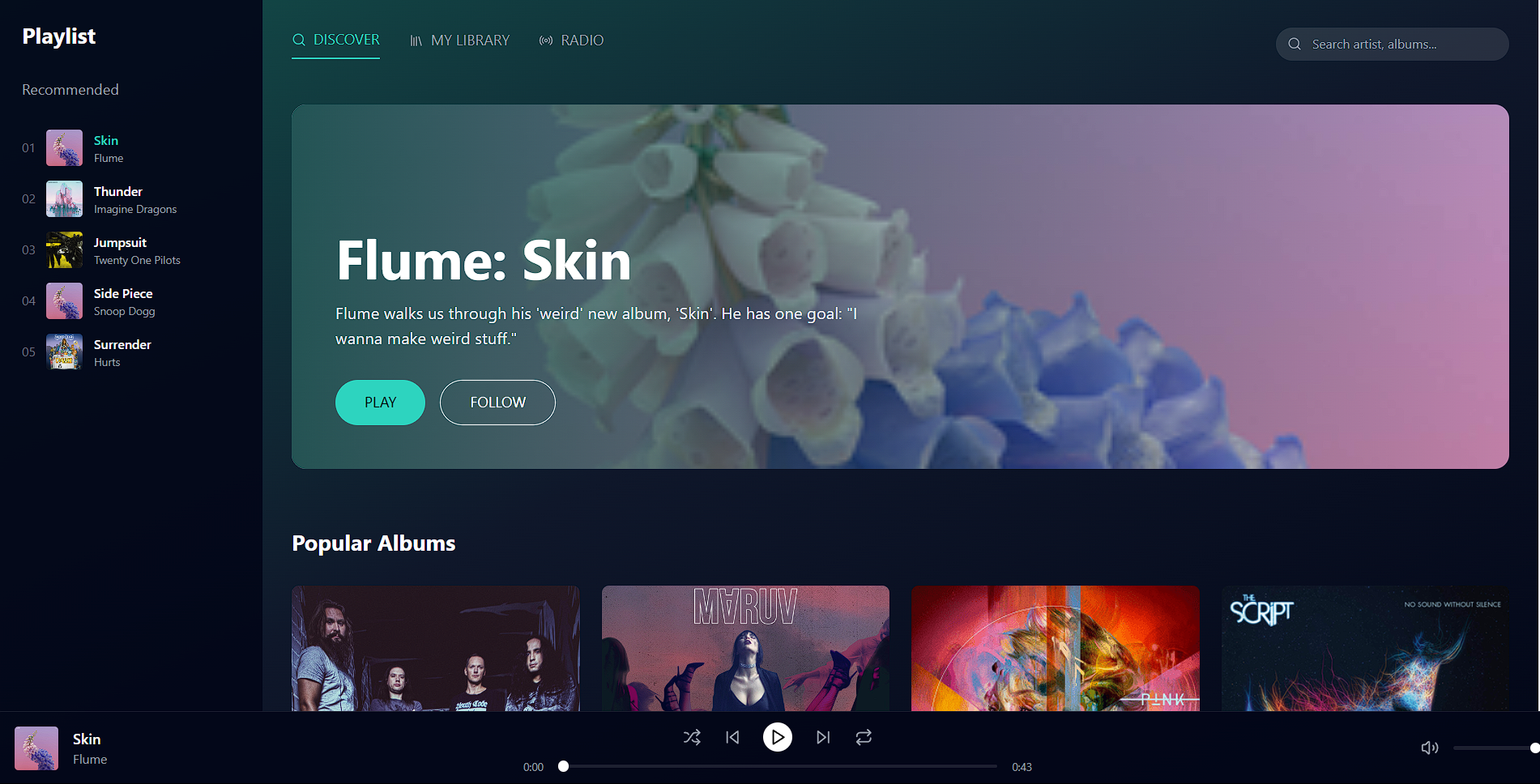
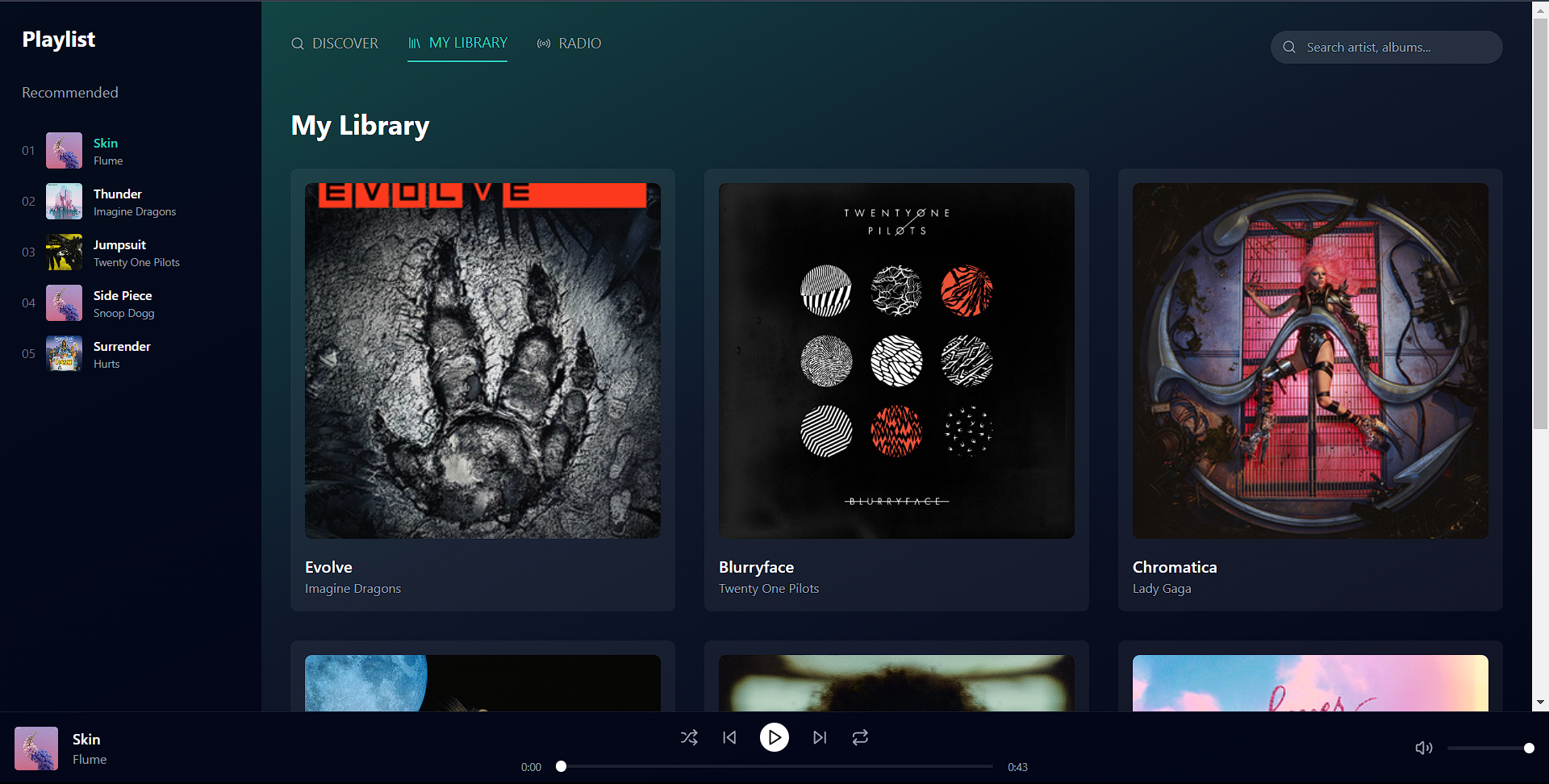
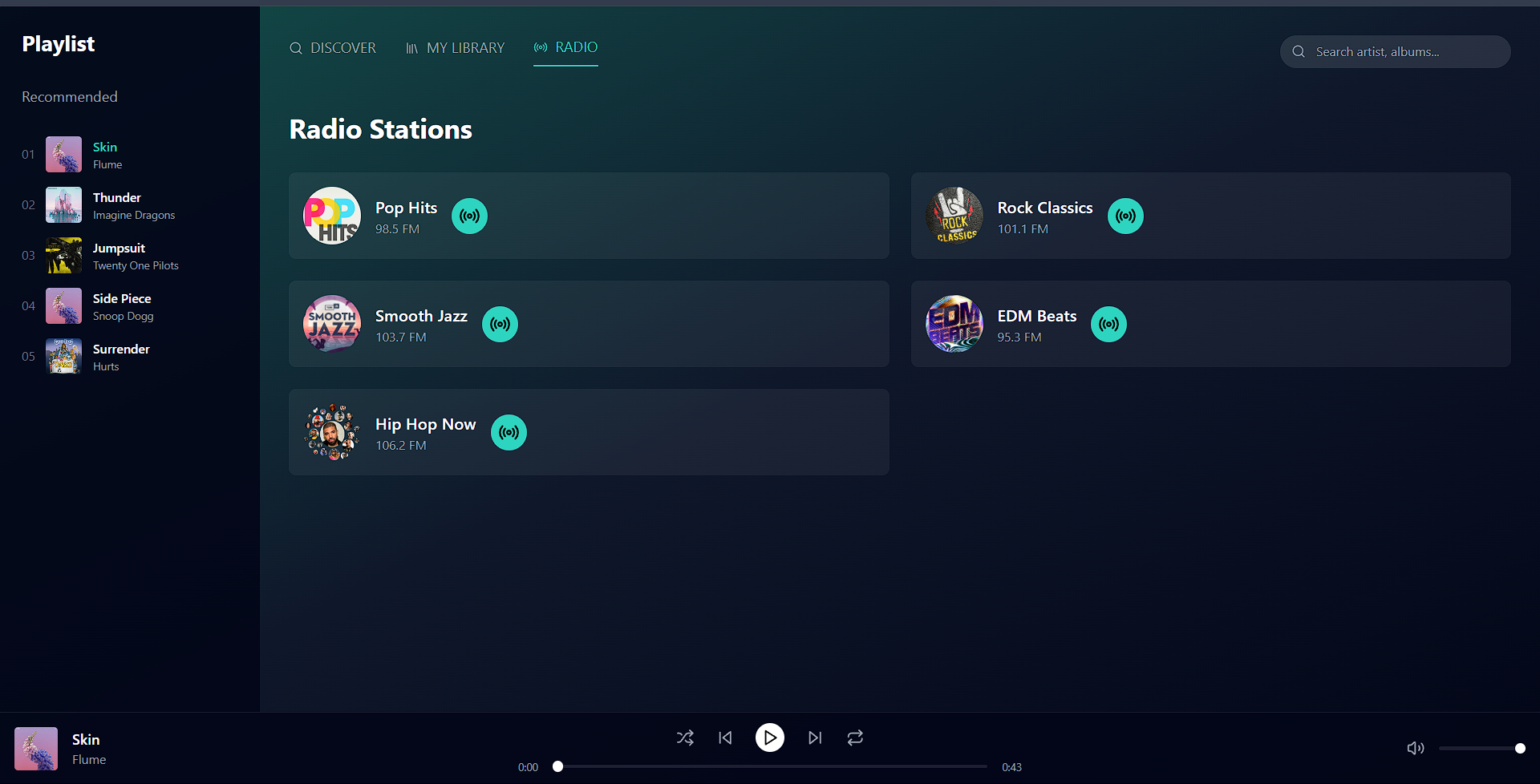
Here’s the code for our Main.jsx:
'use client'

import { useState, useEffect, useRef } from 'react'
import { Search, SkipBack, Play, Pause, SkipForward, Volume2, Shuffle, Repeat, Radio, Library, Menu, X } from 'lucide-react'
import { motion, AnimatePresence } from 'framer-motion'
import song from './Bloody_Mary.mp3'

export default function Component() {
  const [currentSongIndex, setCurrentSongIndex] = useState(0)
  const [isPlaying, setIsPlaying] = useState(false)
  const [volume, setVolume] = useState(1)
  const [currentTime, setCurrentTime] = useState(0)
  const [duration, setDuration] = useState(0)
  const [isShuffling, setIsShuffling] = useState(false)
  const [isLooping, setIsLooping] = useState(false)
  const [activeTab, setActiveTab] = useState('DISCOVER')
  const [isSidebarOpen, setIsSidebarOpen] = useState(true)


  const audioRef = useRef(new Audio())

  const playlistItems = [
    { id: '01', img: "https://upload.wikimedia.org/wikipedia/en/3/35/Flume_-_Skin.png", title: 'Skin', artist: 'Flume', src: song },
    { id: '02', img: "https://upload.wikimedia.org/wikipedia/en/2/28/Imagine_Dragons_Thunder.jpg", title: 'Thunder', artist: 'Imagine Dragons', src: song },
    { id: '03', img: "https://upload.wikimedia.org/wikipedia/en/9/90/Jumpsuit-Nico_and_the_Niners_single_cover.png", title: 'Jumpsuit', artist: 'Twenty One Pilots', src: song },
    { id: '04', img: "https://upload.wikimedia.org/wikipedia/en/3/35/Flume_-_Skin.png", title: 'Side Piece', artist: 'Snoop Dogg', src: song },
    { id: '05', img: "https://i1.sndcdn.com/artworks-JrMt6yEvPiG1-0-t500x500.jpg", title: 'Surrender', artist: 'Hurts', src: song }
]

  const popularAlbums = [
    { title: 'Children of Bodom', artist: 'Hexed', image: 'https://i.scdn.co/image/ab6761610000e5ebe51866b7c973c8aafaf1fece' },
    { title: 'Black Water', artist: 'MARUV', image: 'https://is1-ssl.mzstatic.com/image/thumb/Music128/v4/d0/30/ab/d030abac-f46c-ffd3-89a3-957c1125f47c/190295594541.jpg/1200x1200bb.jpg' },
    { title: 'Hurts 2B Human', artist: 'Pink', image: 'https://upload.wikimedia.org/wikipedia/en/1/17/Pink_-_Hurts_2B_Human.png' },
    { title: 'No Sound Without', artist: 'The Script', image: 'https://upload.wikimedia.org/wikipedia/en/3/39/No_Sound_Without_Silence_by_The_Script.png' }
  ]

  const popularArtists = [
    { name: 'Lady Gaga', image: 'https://variety.com/wp-content/uploads/2024/09/gaga_4d20fb.png?w=1000&h=667&crop=1' },
    { name: 'Bruno Mars', image: 'https://hips.hearstapps.com/hmg-prod/images/gettyimages-134315104.jpg' },
    { name: 'Beyonce', image: 'https://upload.wikimedia.org/wikipedia/commons/thumb/c/ca/Beyonc%C3%A9_-_Tottenham_Hotspur_Stadium_-_1st_June_2023_%285_of_118%29_%2852945900006%29_%28cropped_2%29.jpg/640px-Beyonc%C3%A9_-_Tottenham_Hotspur_Stadium_-_1st_June_2023_%285_of_118%29_%2852945900006%29_%28cropped_2%29.jpg' },
    { name: 'Dua Lipa', image: 'https://upload.wikimedia.org/wikipedia/commons/thumb/1/16/Glasto24_28_300624_%28259_of_545%29_%2853838014719%29_%28cropped%29.jpg/640px-Glasto24_28_300624_%28259_of_545%29_%2853838014719%29_%28cropped%29.jpg' },
    { name: 'MARUV', image: 'https://encrypted-tbn0.gstatic.com/images?q=tbn:ANd9GcRUbquH_Ya0d5KQqVMBEX11-piTdY_pd2wLpA&s' }
  ]

  const libraryAlbums = [
    { title: 'Evolve', artist: 'Imagine Dragons', image: 'https://upload.wikimedia.org/wikipedia/en/1/11/Evolve_Box_Art.png' },
    { title: 'Blurryface', artist: 'Twenty One Pilots', image: 'https://is1-ssl.mzstatic.com/image/thumb/Music211/v4/8e/e2/89/8ee28904-0821-610d-5011-a61845f62756/075679926951.jpg/1200x1200bf-60.jpg' },
    { title: 'Chromatica', artist: 'Lady Gaga', image: 'https://upload.wikimedia.org/wikipedia/en/d/d6/Lady_Gaga_-_Chromatica_%28Official_Album_Cover%29.png' },
    { title: 'Future Nostalgia', artist: 'Dua Lipa', image: 'https://i.scdn.co/image/ab67616d0000b2734bc66095f8a70bc4e6593f4f' },
    { title: 'After Hours', artist: 'The Weeknd', image: 'https://i.scdn.co/image/ab67616d0000b2738863bc11d2aa12b54f5aeb36' },
    { title: 'Lover', artist: 'Taylor Swift', image: 'https://upload.wikimedia.org/wikipedia/en/c/cd/Taylor_Swift_-_Lover.png' },
  ]

  const radioStations = [
    { name: 'Pop Hits', frequency: '98.5 FM', image: 'https://i1.sndcdn.com/artworks-000238705219-wqv8dm-t500x500.jpg' },
    { name: 'Rock Classics', frequency: '101.1 FM', image: 'https://resources.tidal.com/images/64fc71d0/70f8/414d/ba14/30059e01f14c/640x640.jpg' },
    { name: 'Smooth Jazz', frequency: '103.7 FM', image: 'https://cdn-profiles.tunein.com/s249973/images/logog.jpg?t=162282' },
    { name: 'EDM Beats', frequency: '95.3 FM', image: 'https://i.scdn.co/image/ab67616d0000b2734eb60efea889b97c0ee6b171' },
    { name: 'Hip Hop Now', frequency: '106.2 FM', image: 'https://www.storybench.org/wp-content/uploads/2018/12/Rap-Bubbles-e1544644776922.png' },
  ]

  useEffect(() => {
    const audio = audioRef.current
    audio.src = playlistItems[currentSongIndex].src
    audio.volume = volume

    const updateTime = () => setCurrentTime(audio.currentTime)
    const updateDuration = () => setDuration(audio.duration)

    audio.addEventListener('timeupdate', updateTime)
    audio.addEventListener('loadedmetadata', updateDuration)
    audio.addEventListener('ended', handleNext)

    return () => {
      audio.removeEventListener('timeupdate', updateTime)
      audio.removeEventListener('loadedmetadata', updateDuration)
      audio.removeEventListener('ended', handleNext)
    }
  }, [currentSongIndex])

  useEffect(() => {
    const audio = audioRef.current;

    // Set the new song source when the index changes
    audio.src = playlistItems[currentSongIndex].src;

    // Wait until the metadata is loaded before playing
    const onLoadedMetadata = () => {
      if (isPlaying) {
        audio.play(); // Automatically play when the song is set
      }
    };

    audio.addEventListener('loadedmetadata', onLoadedMetadata);

    // Clean up the event listener
    return () => {
      audio.removeEventListener('loadedmetadata', onLoadedMetadata);
    };
  }, [currentSongIndex, isPlaying]);

  // Handle toggling play/pause
  const togglePlay = () => {
    const audio = audioRef.current;

    if (isPlaying) {
      audio.pause(); // Pause the song
    } else {
      audio.play(); // Play the song
    }
    setIsPlaying(!isPlaying); // Toggle the play state
  };

  const handleNext = () => {
    setCurrentSongIndex((prevIndex) => {
      if (isShuffling) {
        let newIndex
        do {
          newIndex = Math.floor(Math.random() * playlistItems.length)
        } while (newIndex === prevIndex)
        return newIndex
      }
      return (prevIndex + 1) % playlistItems.length
    })
  }

  const handlePrevious = () => {
    setCurrentSongIndex((prevIndex) => {
      if (isShuffling) {
        let newIndex
        do {
          newIndex = Math.floor(Math.random() * playlistItems.length)
        } while (newIndex === prevIndex)
        return newIndex
      }
      return prevIndex === 0 ? playlistItems.length - 1 : prevIndex - 1
    })
  }

  const handleVolumeChange = (e) => {
    const newVolume = parseFloat(e.target.value)
    setVolume(newVolume)
    audioRef.current.volume = newVolume
  }

  const handleSeek = (e) => {
    const seekTime = parseFloat(e.target.value)
    setCurrentTime(seekTime)
    audioRef.current.currentTime = seekTime
  }

  const toggleShuffle = () => setIsShuffling(!isShuffling)
  const toggleLoop = () => {
    setIsLooping(!isLooping)
    audioRef.current.loop = !isLooping
  }

  const formatTime = (time) => {
    const minutes = Math.floor(time / 60)
    const seconds = Math.floor(time % 60)
    return `${minutes}:${seconds.toString().padStart(2, '0')}`
  }

  const renderDiscoverContent = () => (
    <>
      {/* Hero Section */}
      <motion.div
        initial={{ opacity: 0, y: 20 }}
        animate={{ opacity: 1, y: 0 }}
        className="mb-8 md:mb-16 relative overflow-hidden rounded-2xl"
      >
        <div className="absolute inset-0 bg-gradient-to-r from-teal-900/90 to-transparent z-10"></div>
        <img
          src="https://upload.wikimedia.org/wikipedia/en/3/35/Flume_-_Skin.png"
          alt="Hero"
          className="w-full h-[200px] md:h-[400px] object-cover"
        />
        <div className="absolute bottom-4 md:bottom-12 left-4 md:left-12 z-20">
          <h1 className="text-3xl md:text-6xl font-bold mb-2 md:mb-4">Flume: Skin</h1>
          <p className="text-sm md:text-lg text-gray-200 mb-4 md:mb-8 max-w-xl hidden md:block">
            Flume walks us through his 'weird' new album, 'Skin'.
            He has one goal: "I wanna make weird stuff."
          </p>
          <div className="flex space-x-4">
            <button
              className="bg-teal-400 text-black px-4 md:px-8 py-2 md:py-3 rounded-full hover:bg-teal-300 transition-colors text-sm md:text-base"
              onClick={() => {
                setCurrentSongIndex(0)
                setIsPlaying(true)
                audioRef.current.play()
              }}
            >
              PLAY
            </button>
            <button className="border border-white px-4 md:px-8 py-2 md:py-3 rounded-full hover:bg-white/10 transition-colors text-sm md:text-base">
              FOLLOW
            </button>
          </div>
        </div>
      </motion.div>

      {/* Popular Albums */}
      <section className="mb-8 md:mb-16">
        <h2 className="text-xl md:text-2xl font-bold mb-4 md:mb-8">Popular Albums</h2>
        <div className="grid grid-cols-2 md:grid-cols-4 gap-4 md:gap-6">
          {popularAlbums.map((album, index) => (
            <motion.div
              key={album.title}
              initial={{ opacity: 0, y: 20 }}
              animate={{ opacity: 1, y: 0 }}
              transition={{ delay: index * 0.1 }}
              className="group cursor-pointer"
            >
              <div className="relative overflow-hidden rounded-lg mb-2 md:mb-4">
                <img
                  src={album.image}
                  alt={album.title}
                  className="w-full aspect-square object-cover transform group-hover:scale-105 transition-transform duration-300"
                />
                <div className="absolute inset-0 bg-black/40 opacity-0 group-hover:opacity-100 transition-opacity flex items-center justify-center">
                  <Play className="w-8 md:w-12 h-8 md:h-12" />
                </div>
              </div>
              <h3 className="font-medium text-sm md:text-base">{album.title}</h3>
              <p className="text-xs md:text-sm text-gray-400">{album.artist}</p>
            </motion.div>
          ))}
        </div>
      </section>

      {/* Popular Artists */}
      <section>
        <h2 className="text-xl md:text-2xl font-bold mb-4 md:mb-8">Popular Artists</h2>
        <div className="flex space-x-4 md:space-x-8 overflow-x-auto pb-4">
          {popularArtists.map((artist, index) => (
            <motion.div
              key={artist.name}
              initial={{ opacity: 0, scale: 0.8 }}
              animate={{ opacity: 1, scale: 1 }}
              transition={{ delay: index * 0.1 }}
              className="text-center flex-shrink-0"
            >
              <div className="w-16 h-16 md:w-20 md:h-20 rounded-full overflow-hidden mb-2 md:mb-3 mx-auto">
                <img
                  src={artist.image}
                  alt={artist.name}
                  className="w-full h-full object-cover hover:scale-110 transition-transform duration-300"
                />
              </div>
              <p className="text-xs md:text-sm">{artist.name}</p>
            </motion.div>
          ))}
        </div>
      </section>
    </>
  )

  const renderLibraryContent = () => (
    <motion.div
      initial={{ opacity: 0, y: 20 }}
      animate={{ opacity: 1, y: 0 }}
      className="mb-8 md:mb-16"
    >
      <h2 className="text-2xl md:text-3xl font-bold mb-4 md:mb-8">My Library</h2>
      <div className="grid grid-cols-2 md:grid-cols-3 gap-4 md:gap-8">
        {libraryAlbums.map((album, index) => (
          <motion.div
            key={album.title}
            initial={{ opacity: 0, y: 20 }}
            animate={{ opacity: 1, y: 0 }}
            transition={{ delay: index * 0.1 }}
            className="bg-white/5 p-3 md:p-4 rounded-lg hover:bg-white/10 transition-colors"
          >
            <img
              src={album.image}
              alt={album.title}
              className="w-full aspect-square object-cover rounded-lg mb-2 md:mb-4"
            />
            <h3 className="font-semibold text-sm md:text-lg">{album.title}</h3>
            <p className="text-xs md:text-sm text-gray-400">{album.artist}</p>
          </motion.div>
        ))}
      </div>
    </motion.div>
  )

  const renderRadioContent = () => (
    <motion.div
      initial={{ opacity: 0, y: 20 }}
      animate={{ opacity: 1, y: 0 }}
      className="mb-8 md:mb-16"
    >
      <h2 className="text-2xl md:text-3xl font-bold mb-4 md:mb-8">Radio Stations</h2>
      <div className="grid grid-cols-1 md:grid-cols-2 gap-4 md:gap-6">
        {radioStations.map((station, index) => (
          <motion.div
            key={station.name}
            initial={{ opacity: 0, y: 20 }}
            animate={{ opacity: 1, y: 0 }}
            transition={{ delay: index * 0.1 }}
            className="bg-white/5 p-3 md:p-4 rounded-lg flex items-center space-x-3 md:space-x-4 hover:bg-white/10 transition-colors"
          >
            <img
              src={station.image}
              alt={station.name}
              className="w-12 h-12 md:w-16 md:h-16 rounded-full"
            />
            <div>
              <h3 className="font-semibold text-sm md:text-lg">{station.name}</h3>
              <p className="text-xs md:text-sm text-gray-400">{station.frequency}</p>
            </div>
            <button className="ml-auto bg-teal-400 text-black p-2 rounded-full hover:bg-teal-300 transition-colors">
              <Radio className="w-4 h-4 md:w-6 md:h-6" />
            </button>
          </motion.div>
        ))}
      </div>
    </motion.div>
  )

  return (
    <div className="h-screen bg-gradient-to-br from-teal-900 via-slate-900 to-slate-950 text-white overflow-hidden flex flex-col">
      {/* Main Content */}
      <div className="flex flex-1 overflow-hidden">
        {/* Sidebar */}
        <AnimatePresence>
          {isSidebarOpen && (
            <motion.div
              initial={{ x: -300 }}
              animate={{ x: 0 }}
              exit={{ x: -300 }}
              className="fixed inset-y-0 left-0 w-72 bg-slate-950/90 p-6 overflow-y-auto z-50 md:relative md:block"
            >
              <button
                className="absolute top-4 right-4 md:hidden"
                onClick={() => setIsSidebarOpen(false)}
              >
                <X className="w-6 h-6" />
              </button>
              <h1 className="text-2xl font-bold mb-8">Playlist</h1>
              <nav className="space-y-4 mb-8">
               {
                /*
                <a href="#" className="flex items-center space-x-2 text-teal-400">
                  <span className="w-1 h-1 bg-teal-400 rounded-full"></span>
                  <span>My Playlist</span>
                </a>
                */
               }
                <a href="#" className="flex items-center space-x-2 text-gray-400 hover:text-white transition-colors">
                  <span>Recommended</span>
                </a>
              </nav>
              <div className="space-y-4">
                {playlistItems.map((item, index) => (
                  <motion.div
                    key={item.id}
                    whileHover={{ scale: 1.02 }}
                    className={`flex items-center space-x-3 group cursor-pointer ${index === currentSongIndex ? 'text-teal-400' : ''}`}
                    onClick={() => {
                      setCurrentSongIndex(index)
                      setIsPlaying(true)
                      audioRef.current.play()
                    }}
                  >
                    <span className="text-sm text-gray-500">{item.id}</span>
                    <img src={`${item.img}`} alt={`${item.title}`} className="w-10 h-10 rounded" />
                    <div className="flex-1">
                      <p className="text-sm font-medium">{item.title}</p>
                      <p className="text-xs text-gray-400">{item.artist}</p>
                    </div>
                  </motion.div>
                ))}
              </div>
            </motion.div>
          )}
        </AnimatePresence>

        {/* Main Content Area */}
        <div className="flex-1 overflow-y-auto p-4 md:p-8">
          {/* Navigation */}
          <div className="flex items-center justify-between mb-6 md:mb-12">
            <button
              className="md:hidden"
              onClick={() => setIsSidebarOpen(true)}
            >
              <Menu className="w-6 h-6" />
            </button>
            <nav className="flex space-x-4 md:space-x-8">
              {['DISCOVER', 'MY LIBRARY', 'RADIO'].map((tab) => (
                <a
                  key={tab}
                  href="#"
                  className={`${
                    activeTab === tab ? 'text-teal-400 border-b-2 border-teal-400' : 'text-gray-400'
                  } hover:text-white transition-colors pb-2 flex items-center space-x-1 md:space-x-2 text-sm md:text-base`}
                  onClick={() => setActiveTab(tab)}
                >
                  {tab === 'DISCOVER' && <Search className="w-3 h-3 md:w-4 md:h-4" />}
                  {tab === 'MY LIBRARY' && <Library className="w-3 h-3 md:w-4 md:h-4" />}
                  {tab === 'RADIO' && <Radio className="w-3 h-3 md:w-4 md:h-4" />}
                  <span>{tab}</span>
                </a>
              ))}
            </nav>
            <div className="relative hidden md:block">
              <Search className="absolute left-3 top-1/2 transform -translate-y-1/2 text-gray-400 w-4 h-4" />
              <input
                type="text"
                placeholder="Search artist, albums..."
                className="bg-white/10 rounded-full pl-10 pr-4 py-2 text-sm focus:outline-none focus:ring-2 focus:ring-teal-400 w-64"
              />
            </div>
          </div>

          {/* Conditional Content Rendering */}
          {activeTab === 'DISCOVER' && renderDiscoverContent()}
          {activeTab === 'MY LIBRARY' && renderLibraryContent()}
          {activeTab === 'RADIO' && renderRadioContent()}
        </div>
      </div>

      {/* Player Bar */}
      <motion.div
        initial={{ y: 100 }}
        animate={{ y: 0 }}
        className="h-20 bg-slate-950/90 border-t border-white/10 flex items-center px-4"
      >
        <div className="flex items-center flex-1">
          <img
            src={`${playlistItems[currentSongIndex].img}`}
            alt={`${playlistItems[currentSongIndex].title}`}
            className="w-10 h-10 md:w-12 md:h-12 rounded mr-2 md:mr-4"
          />
          <div className="hidden md:block">
            <p className="font-medium text-sm md:text-base">{playlistItems[currentSongIndex].title}</p>
            <p className="text-xs md:text-sm text-gray-400">{playlistItems[currentSongIndex].artist}</p>
          </div>
        </div>
        <div className="flex-1 flex flex-col items-center">
          <div className="flex items-center space-x-2 md:space-x-6">
            <button
              className={`text-gray-400 hover:text-white transition-colors ${isShuffling ? 'text-teal-400' : ''}`}
              onClick={toggleShuffle}
            >
              <Shuffle className="w-4 h-4 md:w-5 md:h-5" />
            </button>
            <button className="text-gray-400 hover:text-white transition-colors" onClick={handlePrevious}>
              <SkipBack className="w-4 h-4 md:w-5 md:h-5" />
            </button>
            <button
              className="w-8 h-8 rounded-full bg-white text-black flex items-center justify-center hover:bg-gray-200 transition-colors"
              onClick={togglePlay}
            >
              {isPlaying ? <Pause className="w-4 h-4 md:w-5 md:h-5" /> : <Play className="w-4 h-4 md:w-5 md:h-5" />}
            </button>
            <button className="text-gray-400 hover:text-white transition-colors" onClick={handleNext}>
              <SkipForward className="w-4 h-4 md:w-5 md:h-5" />
            </button>
            <button
              className={`text-gray-400 hover:text-white transition-colors ${isLooping ? 'text-teal-400' : ''}`}
              onClick={toggleLoop}
            >
              <Repeat className="w-4 h-4 md:w-5 md:h-5" />
            </button>
          </div>
          <div className="w-full flex items-center space-x-2 md:space-x-4 mt-1 md:mt-2">
            <span className="text-xs text-gray-400 hidden md:inline">{formatTime(currentTime)}</span>
            <input
              type="range"
              min="0"
              max={duration || 0}
              value={currentTime}
              onChange={handleSeek}
              className="flex-1 h-1 bg-white/10 rounded-full appearance-none [&::-webkit-slider-thumb]:appearance-none [&::-webkit-slider-thumb]:w-2 [&::-webkit-slider-thumb]:h-2 md:[&::-webkit-slider-thumb]:w-3 md:[&::-webkit-slider-thumb]:h-3 [&::-webkit-slider-thumb]:rounded-full [&::-webkit-slider-thumb]:bg-white"
            />
            <span className="text-xs text-gray-400 hidden md:inline">{formatTime(duration)}</span>
          </div>
        </div>
        <div className="flex-1 hidden md:flex justify-end items-center space-x-4">
          <Volume2 className="w-5 h-5 text-gray-400" />
          <input
            type="range"
            min="0"
            max="1"
            step="0.01"
            value={volume}
            onChange={handleVolumeChange}
            className="w-24 h-1 bg-white/10 rounded-full appearance-none [&::-webkit-slider-thumb]:appearance-none [&::-webkit-slider-thumb]:w-3 [&::-webkit-slider-thumb]:h-3 [&::-webkit-slider-thumb]:rounded-full [&::-webkit-slider-thumb]:bg-white"
          />
        </div>
      </motion.div>
    </div>
  )
}